See how your business
actually runs.
Pick a process. Map the steps in the order they actually happen. See who owns what, where decisions branch, and exactly where things slow down — in flow view or swimlane view. Export and hand it off.
One-time license. Instant Access. Runs in your browser
Your processes live in your head. And that means they can't run without you.
You've onboarded enough clients to know how it goes. You've delivered enough projects to have a rhythm. But none of it is written down — and every time something breaks, or someone new joins, or a client asks how things work, you're the one who has to explain it from scratch.
You can't delegate a process that only exists in your memory. You can't improve what you can't see. And you can't hand off steps you've never mapped out — which means you stay in the middle of everything, every time.
The Visual Workflow Mapper gets it out of your head and onto one page — in the order things actually happen, with owners for every step.
You already know how your business runs. The Mapper just turns what you know into something you can actually hand off.
Pick a process. Map the steps. See where it breaks.
No flowchart software. No training required. Just your process, your people, and one clean visual on the other side.
Choose your process
Pick the workflow you want to map — client onboarding, content creation, invoicing, service delivery. Start with the one that breaks most often or that you most want to delegate.
Map every step
Add steps in the order they actually happen. Assign an owner to each one. Mark where decisions branch. Use pre-built templates or start from scratch — it's up to you.
Export and hand it off
Switch to swimlane view to see who owns what at a glance. Spot the handoff gaps. Download as PNG or PDF and drop it into an SOP, share it with your team, or use it to finally delegate.
Six features. One process, fully visible.
Everything you need to map, review, and hand off any business workflow — in one tool, no extra software.
Plus: The Visual Workflow Mapper Field Guide
A 6-page PDF companion that walks you through what to do with your map once it's built. How to choose which process to tackle first. How to spot the real handoff gaps. How to turn a map into a working SOP your team can follow.
Download it, print it, keep it next to you while you work through the tool.
Your process. On one page. Finally.
The Visual Workflow Mapper is for business owners who are ready to stop being the only person who knows how everything works.
This is for you if…
- You have repeatable processes that still live only in your head
- You want to delegate but can't explain the steps clearly enough to hand them off
- You're building SOPs and need a visual foundation to work from
- Something keeps breaking and you want to see exactly where
- You're onboarding a team member and need a single source of truth
Come back when…
- You haven't done the process enough to know the steps yet — map it after you've run it a few times
- You're looking for someone to build your SOPs for you (this tool maps; implementation is still yours)
- You only have one process and it's fully simple — this is built for workflows, not one-step tasks
Get Access
Your Process. On one page. Finally.
The Visual Workflow Mapper
$47
One-time license. No subscription
Flow view and Swimlane view for any process
Step by step mapping with owners and decision points
Bottleneck flags so you know exactly where stall
Delegation spots marked so you know what to hand off first
Export as PNG or PDF - drop it into an SOP or share with your team
The Visual Workflow Mapper Field Guide (6-page PDF) included
Got Questions? Email contact@virtuallystrucutured.com
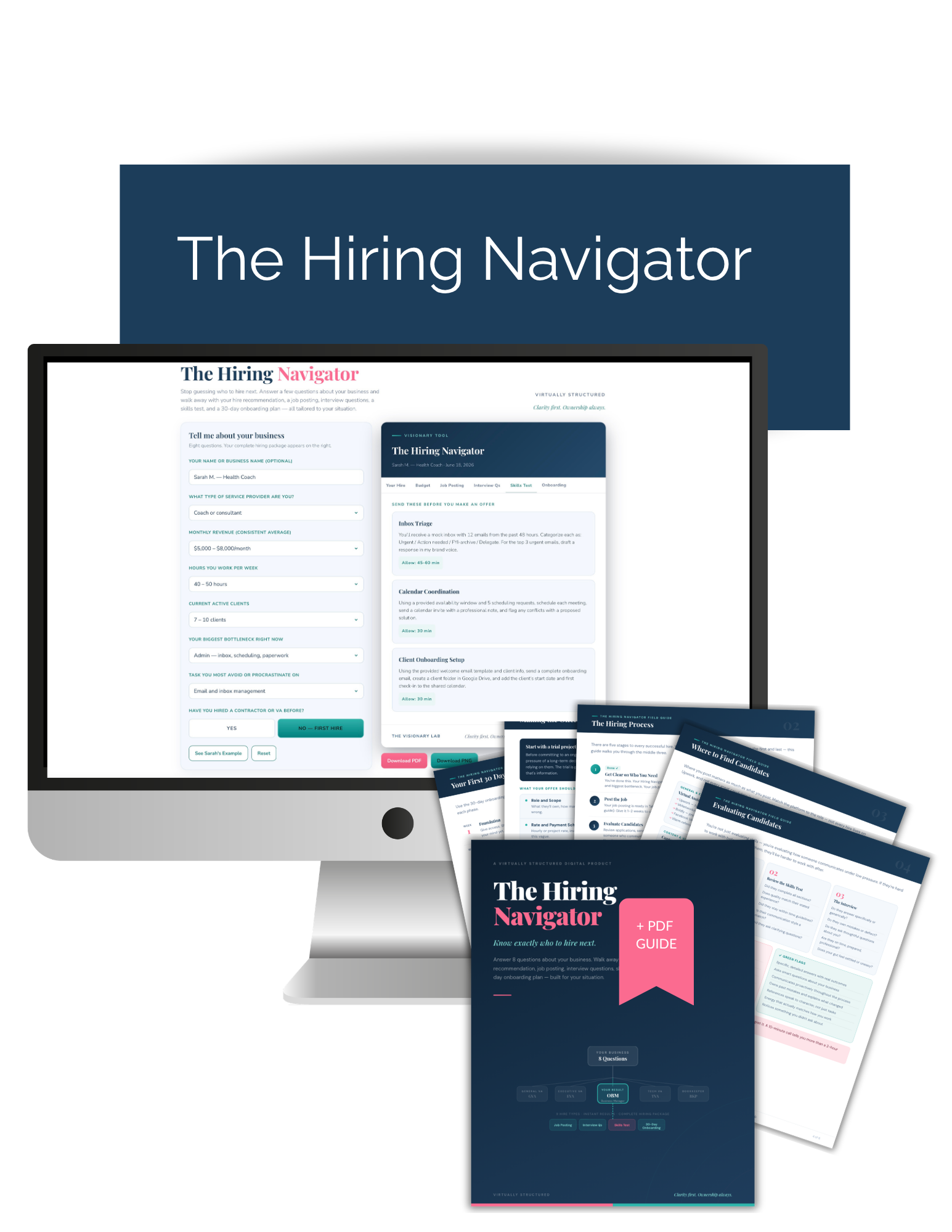
Stop guessing who to hire next. Answer 8 questions about your business and walk away with your complete hiring package — role recommendation, budget ranges, job posting, interview questions, skills test, and 30-day onboarding plan. Built for your situation. Instant results.
The Hiring Navigator is an 8-question decision tool that tells you exactly who to hire next — and then builds your complete hiring package on the spot.
Answer questions about your revenue, hours, active clients, and biggest bottleneck. In about 3 minutes, you get:
→ Your hire recommendation (from 9 role types matched to your situation)
→ Budget ranges — hourly rate, weekly hours, monthly estimate
→ A ready-to-post job listing, written for your specific role
→ 10 interview questions built for that hire
→ A 3-part skills test to vet candidates before you commit
→ A week-by-week 30-day onboarding plan
Plus: The Hiring Navigator Field Guide — a 6-page downloadable PDF companion that walks you through finding candidates, evaluating them, making the offer, and running your first 30 days together.
One-time license. Permanent access. Runs entirely in your browser — no account, no app, no download, no waiting. This is an interactive tool. You own it.
What's Included
✓ The Hiring Navigator tool (instant results, runs in your browser)
✓ 6 output tabs: hire recommendation, budget, job posting, interview questions, skills test, 30-day onboarding plan
✓ PNG + PDF export of your results
✓ The Hiring Navigator Field Guide — 6-page downloadable PDF companion
✓ Permanent access — revisit and rerun whenever you need it
Common questions
The process is already in your head. Let’s get it on paper.
Pick one workflow. Map it today. Hand it off this week.
One-time license. Instant Access. Runs in your browser

2026 Virtually Structured. The Visionary Lab